Largest Contentful Paint (LCP)
LoadingMeasures when the main picture or headline finishes appearing. Google wants it inside 2.5 seconds. Photos uploaded at full size and hosting that is slow to answer are behind most failures.

Speed Optimization
Faster pages for North Bay business sites, tested the way customers load them: on a phone, on mobile data, sometimes out of town where the signal is weaker than it is downtown.

At your desk in North Bay, Ontario, your own website probably feels quick: fast internet, a decent computer, and a browser that remembers half the page from last time. Customers rarely meet it like that. They open it for the first time on a phone, on mobile data, from a truck at a job site, a cottage road outside Callander or the stands at a hockey game, and the same page can take several times as long.
Patience on a phone is short. If the screen is still blank after a few seconds, many people simply go back and choose another result, and Google also reads speed data collected from real Chrome users when it weighs page experience. A lighter page wins on both counts.
Some North Bay pages carry more weight than most. Student rental listings with dozens of photos, waterfront cottage listings, menus posted as PDFs and grocery flyers all ask a phone to download a lot before anything useful shows. Searches such as “north bay apartments for rent under $1000” and “north bay grocery flyers” come from people comparing several options at once, and the page that shows its information first gets the call.
Search demand
Google.ca suggestions from 4 October 2026. Nobody here searches for site speed by name, but these searches lead to the kinds of pages that are slowest on a phone.
Some pages matter far more than others. For North Bay businesses it is usually the rushed visit: a menu opened in a parked car in Callander, a rental listing checked between lectures at Nipissing or Canadore, hours confirmed while the windshield defrosts. Your analytics show which pages those are, and they go to the front of the queue. The target is a green result in real-visitor data, since squeezing out the final lab points seldom adds a single phone call.
Usual suspects
A sluggish site usually suffers from more than one of these.
A single picture from a recent phone can run to several megabytes, then get squeezed into a small box on the page. Resized to fit and saved as WebP, the same picture often weighs a small fraction as much.
Nothing is readable until the whole file arrives, and search engines make little use of text locked inside an image. A simple web page carrying the same prices is quicker and easier to find.
Visual page builders tend to load their entire toolkit on every page, including the parts that page never uses.
Chat bubbles, pop-ups, social feeds, map embeds and duplicate tracking tags each add their own downloads, and few sites ever review which ones still earn their place.
When the server needs a full second just to begin sending the page, every later fix starts from behind. Caching softens it; sometimes moving host is the only real cure.
What Google measures
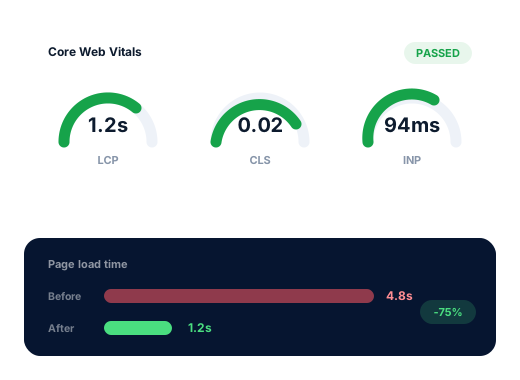
Chrome reports these from actual visitors and Google looks back over 28 days. A pass means at least 75% of visits reached the mark on all three.
Measures when the main picture or headline finishes appearing. Google wants it inside 2.5 seconds. Photos uploaded at full size and hosting that is slow to answer are behind most failures.
Measures the delay between a tap and the screen changing in reply. The goal is under 200 milliseconds. Heavy scripts, such as live chat, image sliders and stacked analytics tags, are the usual cause of sluggish taps.
Measures how far things jump while the page settles, which is why a thumb lands on the wrong link. Stay under 0.1 by giving every image, banner and late-loading box a fixed space from the start.
The work
Field and lab figures for your main pages written down first, so the improvement can be shown to you rather than simply claimed.
Every image resized to the space it fills, compressed, served as WebP and fetched only when the visitor scrolls close to it.
Menus, flyers, price lists and schedules rebuilt as light HTML, so they open fast on a phone and search engines can read every line.
Plugins nobody uses removed, live chat and analytics told to wait until the page is readable, and web fonts stored on your own server.
Server and browser caching set up to match your particular host, so repeat visitors see pages almost at once.
Lab tests rerun the day the changes go live, then the real-visitor figures reviewed once Google has gathered a fresh 28 days.
Done carefully
The standards we keep for every client, in writing, so you can check us against them.
A quick page cannot rescue thin content, and nobody needs a perfect score to rank in North Bay.
Speed is one input among hundreds in Google’s ranking; what it reliably buys is fewer visitors abandoning the page. Once yours is quick enough we will say so plainly and suggest where the next dollar would go further, perhaps a missing service page or a tidier Business Profile. Speed work is billed once, on a quote written after we audit the site.
Ask us about your business
How we work
Four steps that take a North Bay business from hard to find to easy to choose.
We review your site and Business Profile, then check rankings from downtown North Bay and the towns you serve.
We pick the searches worth winning, including the “ontario” versions, and give each one its own page.
Profile, page, content and listing fixes, beginning with the changes most likely to bring calls.
A short monthly note on calls, messages and positions, and what we intend to do next.
Questions
Yes. Enter your web address at PageSpeed Insights and switch to the mobile tab. The top block, built from real visits, matters most; when it reports too little traffic, lean on the lab numbers underneath. Then try the site on your own phone over mobile data, ideally on a back road out of town.
On a phone, the main content appears inside 2.5 seconds, a tap responds inside 200 milliseconds and the layout holds still while loading. Beyond those marks, more speed seldom moves the needle for a North Bay business.
Sometimes, when everything else between you and a rival is even. The surer payoff is that fewer people bail out before they phone, book or drive over.
Not if they are prepared properly. Each photo should be resized for the space it fills, compressed and loaded as the visitor scrolls, so the first few appear quickly and the rest follow. Galleries are often the biggest single win on property sites.
A week or two of work for most small sites. Google’s field data runs on a 28-day window, so the official green light tends to arrive about four weeks after launch.
We price it once, in Canadian dollars, after an audit, since every slow site is slow for its own reasons. Keeping it fast afterwards falls under routine upkeep, which comes with each monthly plan ($300, $500 or $700).
Further reading
More reading on this subject for owners in North Bay and the towns nearby.
Each service works on its own, and most clients begin with just one.
Every industry here searches in its own way, so every page has its own research.
A free check of your rankings from downtown out to Callander, the listings sitting above yours and the fixes worth doing first.
Request my free audit